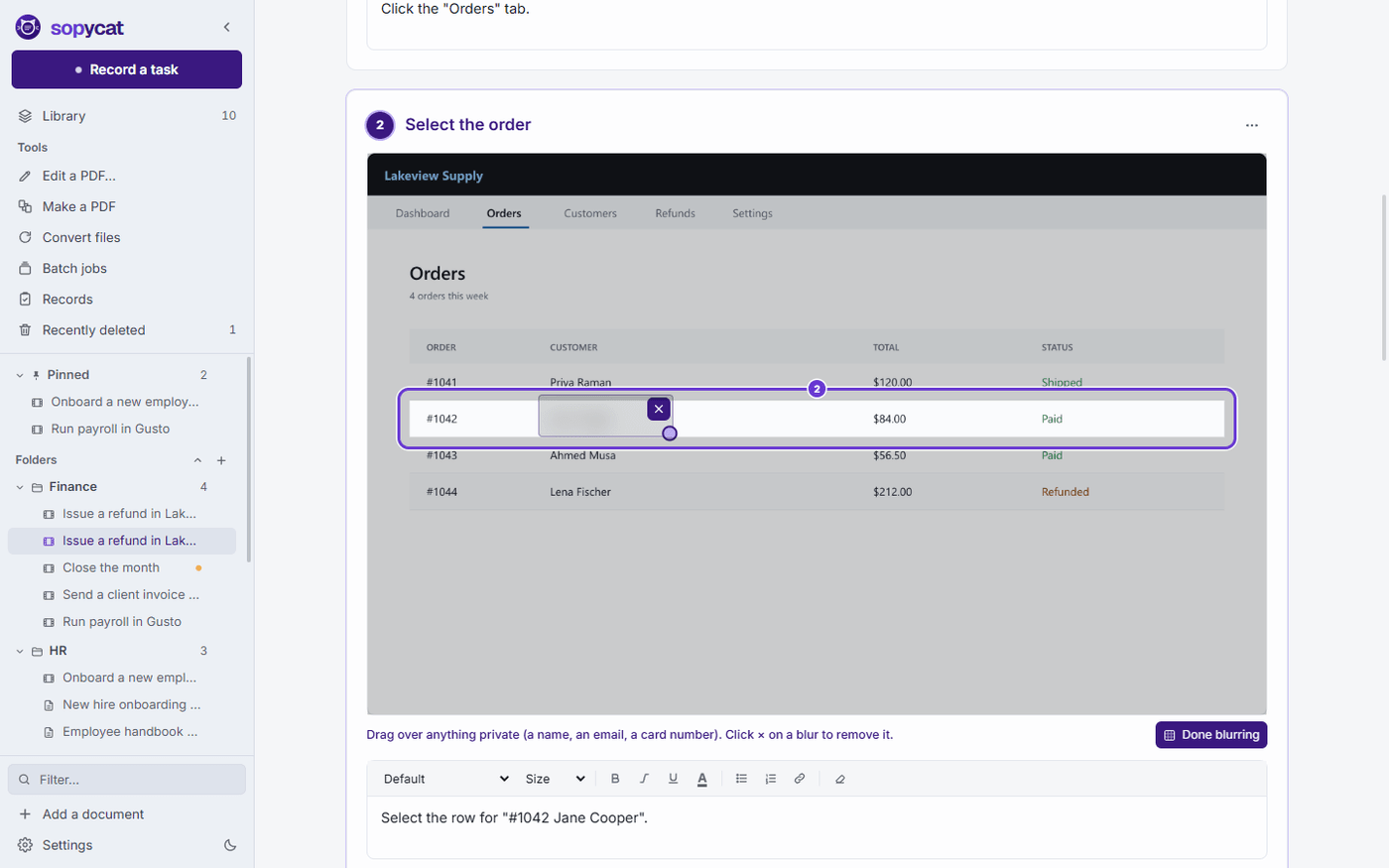
2Select #1044 Lena Fischer#1043Ahmed Musa$56.50#1044Lena Fischer$212.002
3Enter 25.00 in AmountRefund amount25.003
4Click Save changesSave changes4Cancel
Manual ready: 4 stepsRecording
Works in any programDesktop software, websites, the old system in the back office. If it is on your screen, Sopycat can follow it.
Never leaves your PCThe recording, the pictures and the words are all made on your computer. Nothing is uploaded.
Nothing to sign up forDownload it and start recording. No login, and no workspace to invite people into.
A PDF editor, includedEdit the words in a PDF, sign, fill, redact and merge. No second subscription.
The jobs that live in one person's head
Each one written down in the time it takes to do it once.
Month-end close
Running payroll
New patient intake
Issuing a refund
Onboarding a new hire
Filing an insurance claim
Setting up a user account
Exporting the weekly report
Month-end close
Running payroll
New patient intake
Issuing a refund
Onboarding a new hire
Filing an insurance claim
Setting up a user account
Exporting the weekly report
Reconciling the bank feed
Printing shipping labels
Booking a court date
Resetting a password
Updating the price list
Closing the till
Ordering supplies
Sending the monthly invoices
Reconciling the bank feed
Printing shipping labels
Booking a court date
Resetting a password
Updating the price list
Closing the till
Ordering supplies
Sending the monthly invoices
Every office has a task only one person knows how to do
And the day they are out is the day it needs doing. The how-to never gets written because writing it is miserable. Sopycat makes it the easy part.
Writing it by hand An afternoon
Open the program and start the task
Stop to take a screenshot
Paste it into Word
Crop it
Draw a box round the button
Add an arrow
Number the step
Type the instruction
Blur the customer's name
Take the next screenshot
Crop it again
Line it up with the last one
Copy the button's exact name
Check you did not skip a click
Repeat for every click
Renumber after adding a step
Make the pictures the same size
Write a title and a summary
Save it as a PDF
Email it to the team
Redo it all when the software changes
21 jobs for one procedure. Then the next procedure.
With Sopycat In minutes
Hit Record
Do your task
Hit Stop
That's it. Your step-by-step manual is made.
4steps written
4pictures boxed
From tribal knowledge to a manual anyone can follow
Before Sopycat
It lives in one person's head
When they are off sick or move on, everyone else guesses, or waits.
With Sopycat
Anyone can follow along
A small window walks the next person through it one step at a time, right beside the program they are using.
Before Sopycat
Writing it takes longer than doing it
Screenshots, cropping, arrows, numbers, typing. An afternoon for a five-minute task.
With Sopycat
One run is the whole job
Do the task the normal way. When you press Stop, the steps, pictures, boxes and numbers are already done.
Before Sopycat
The manual quietly goes stale
The software moves a button and nobody notices until someone gets stuck.
With Sopycat
Sopycat spots the drift
Compare a manual with the live screen and it flags the steps that changed. Set a review date and it reminds you.
Before Sopycat
Nobody can prove the training happened
The auditor asks who was trained and when. The answer is an email thread.
With Sopycat
Every run is on record
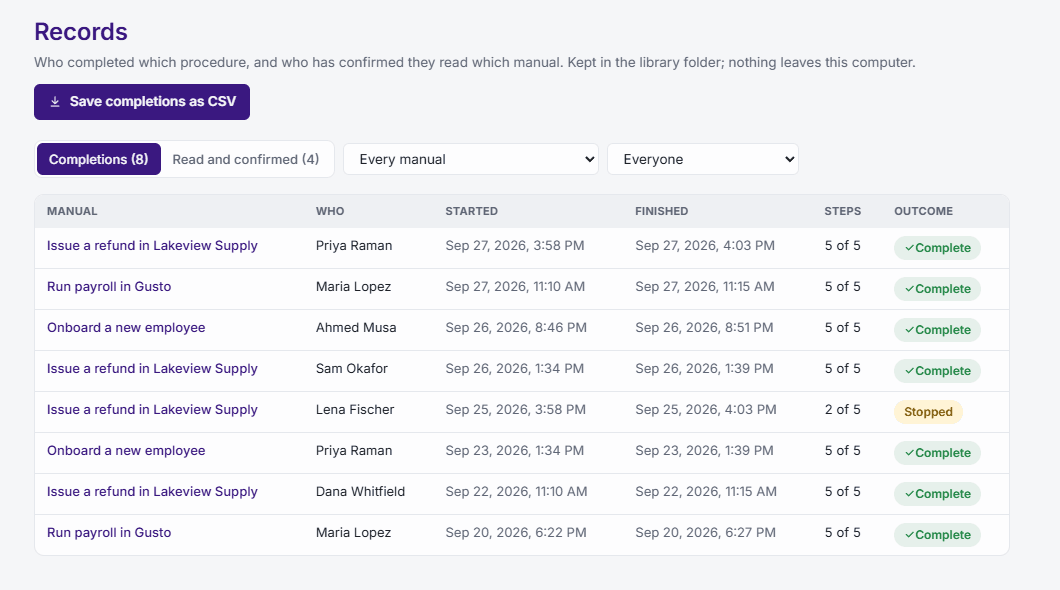
Each follow-along and each “I have read this” is logged with names and dates, and saves as a spreadsheet.
Four tools, four bills, or one app
Writing down how the office works usually means a screenshot tool, a guide maker, a PDF editor and a spreadsheet. Sopycat does all four, on your own PC.
What most offices juggle today
Screenshots and Word
Snip, crop, paste, draw the arrows, type the steps. An afternoon for each procedure, out of date by next quarter.
Hours of someone's time
A guide-making tool
A browser extension that only sees the browser, and uploads every screenshot to its own cloud.
Another per-person subscription
A PDF editor
Acrobat or Nitro, to fill in, sign, redact and fix the forms the procedures point to.
$23.99 a person a month for Acrobat Pro
A training spreadsheet
Who read which procedure, and when, kept by hand. Until the auditor asks for it.
Nobody's job, until it is
Sopycat, one app on each PC
Do the task once: the manual, the video and the checklist write themselves
Records any Windows program, not only the browser
A full PDF editor: fill in, sign, redact, merge, convert
Reading confirmations and training records, saved as a spreadsheet
Blurs names, emails and card numbers in the pictures for you
Share it as a PDF, a Word file, a web page or a video
A shared library on your own drive, with edit locks
Everything made and kept on your own PC. Nothing uploaded, and it works offline
It replaces
Screenshot tool
Guide maker
PDF editor
Training spreadsheet
One price per person. Every feature in every plan.
Press Record a task and work like you normally would. A slim bar stays out of the shot and names each click as you make it, so you can fix a slip on the spot.
1:422 marksEnter 25.00 in AmountMark this spot Ctrl+F8Stop Ctrl+F9
Lakeview Supply
DashboardOrdersCustomers
#1043Ahmed Musa$56.50
#1044Lena Fischer$212.00
#1045Grace Obi$18.20
25.00
Save changesCancel
02
Stop
Sopycat finds every step, names what you clicked, and boxes it on a numbered picture. It usually takes a minute or two.
03
Polish and share
Nudge a box, blur a name, reword a line. Then send it as a PDF, a Word file, a web page, a video, or a checklist to follow along.
1:422 marksEnter 25.00 in AmountMark this spot Ctrl+F8Stop Ctrl+F9
Lakeview Supply
DashboardOrdersCustomers
#1043Ahmed Musa$56.50
#1044Lena Fischer$212.00
#1045Grace Obi$18.20
25.00
Save changesCancel
Steps that sound like a person wrote them
Other tools write “Click here” under a screenshot. Sopycat asks Windows what you actually clicked, then checks every name against a dictionary.
You clicked a tabOpen the Orders tab
You clicked a row in a tableSelect #1044 Lena Fischer
You typed into a box labelled AmountEnter 25.00 in Amount
You opened a list and picked from itChoose Canada in Country
You typed a passwordEnter the PasswordWhat you typed is never written down.
You clicked an icon with no words on itClick Print this pageRead from its tooltip.
Everything comes from the same recording, so there is only ever one thing to keep up to date.
Issue a refund in Lakeview Supply PDF · Word · web page
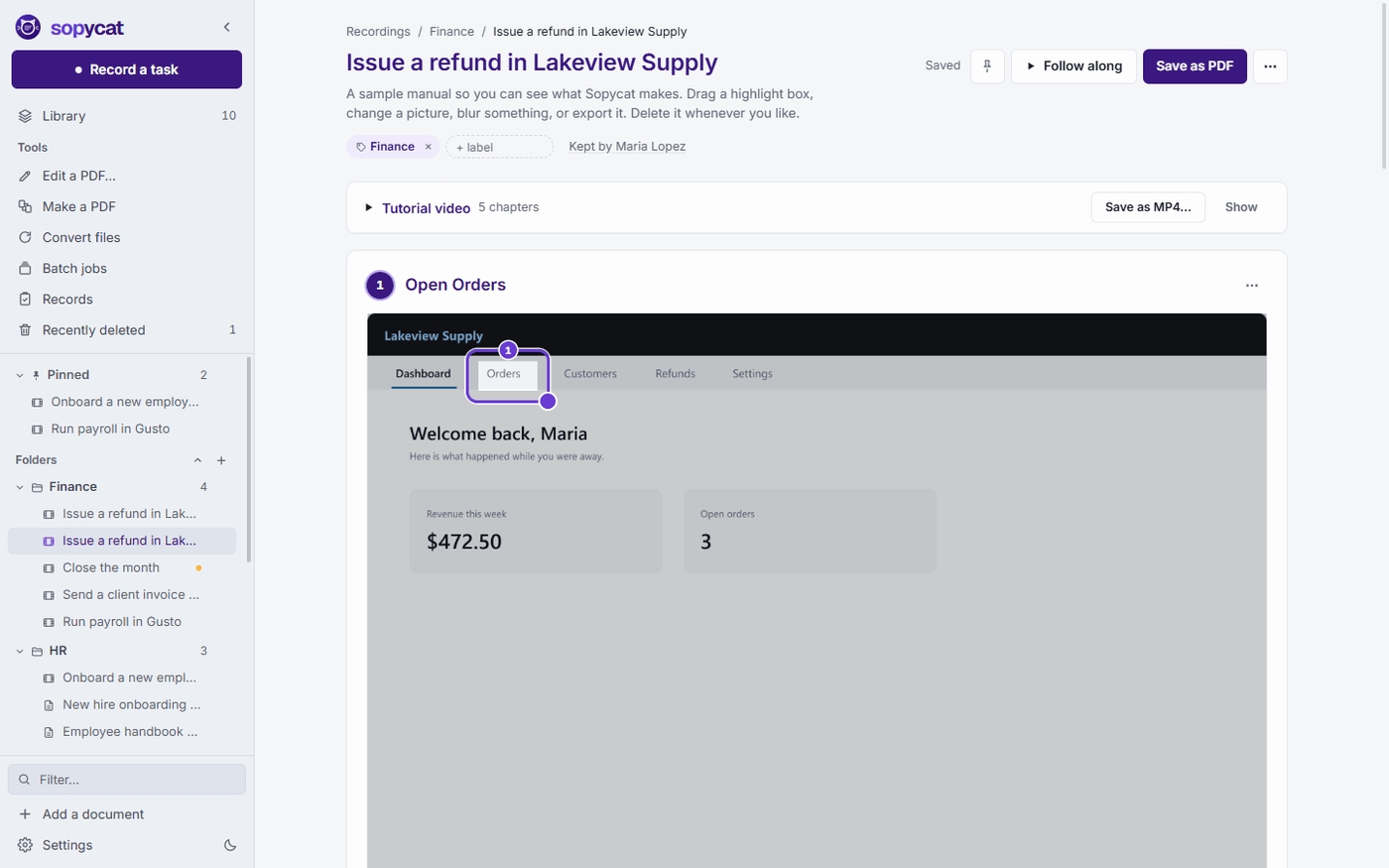
1Open the Orders tabDashboardOrders1Customers
2Select #1044 Lena Fischer#1043Ahmed Musa$56.50#1044Lena Fischer$212.002
3Enter 25.00 in AmountRefund amount25.003
4Click Save changesSave changes4Cancel
Issue a refund.mp4 4 chapters · 0:48
Lakeview Supply
DashboardOrdersCustomers
#1043Ahmed Musa$56.50
#1044Lena Fischer$212.00
#1045Grace Obi$18.20
25.00
Save changesCancel
Step 3: Enter 25.00 in Amount
Follow along Stays on top of your work
Lakeview Supply
DashboardOrdersCustomers
#1043Ahmed Musa$56.50
#1044Lena Fischer$212.00
#1045Grace Obi$18.20
Save changesCancel
Issue a refund · step 2 of 4
Open the Orders tab
Select the order
Enter the amount
Click Save changes
Records Save as a spreadsheet
Who
Manual
What
When
A. Karimi
Issue a refund
Completed
Today 10:42
J. Park
Month-end close
Read
Today 09:15
S. Adeyemi
New patient intake
Completed
Yesterday
M. Rossi
Issue a refund
Read
Mon
D. Whitfield
Onboard a new employee
Completed
Mon
L. Chen
Close the month
Read
Last week
Issue a refund in Lakeview Supply PDF · Word · web page
1Open the Orders tabDashboardOrders1Customers
2Select #1044 Lena Fischer#1043Ahmed Musa$56.50#1044Lena Fischer$212.002
3Enter 25.00 in AmountRefund amount25.003
4Click Save changesSave changes4Cancel
Stop paying for a second PDF app
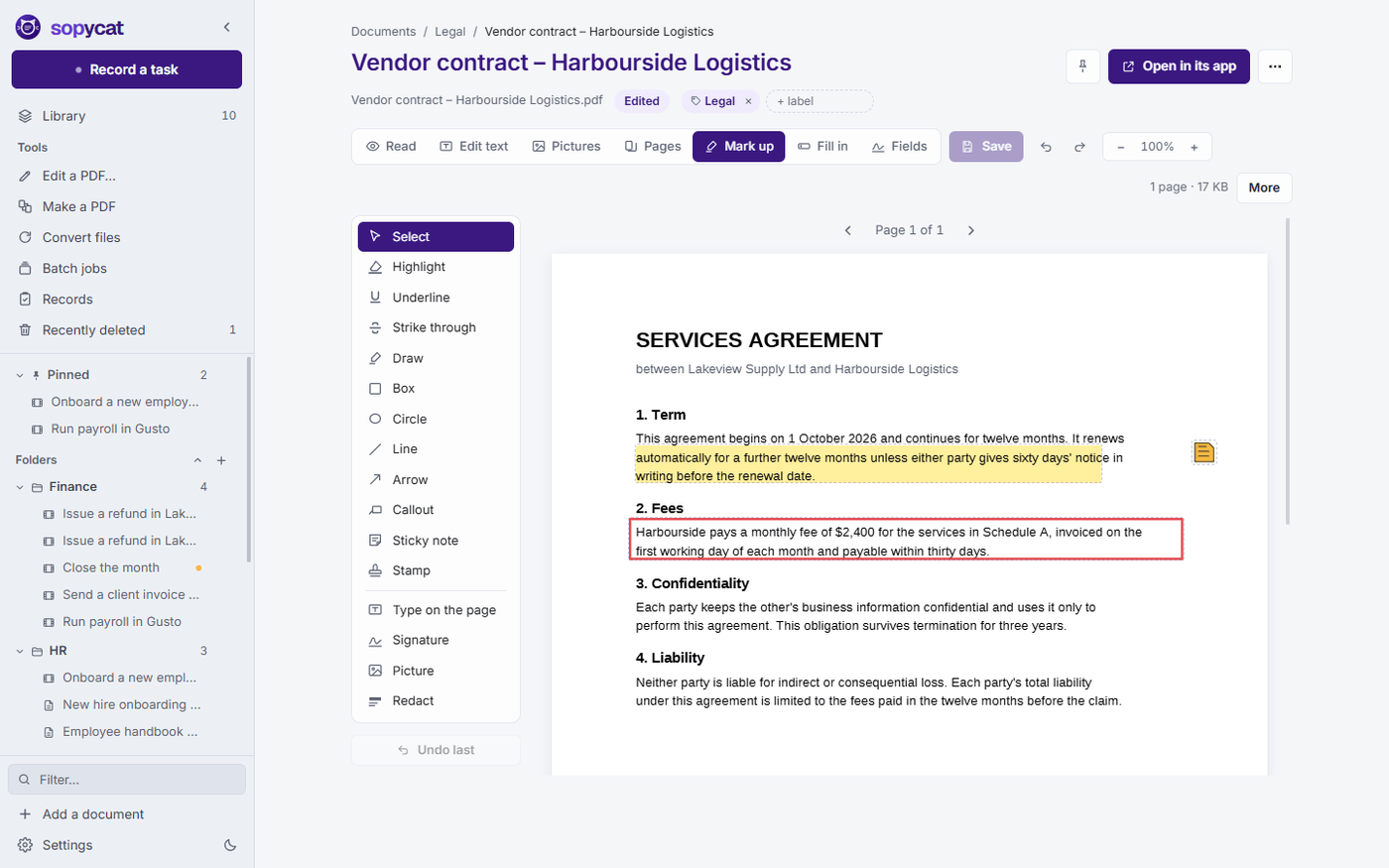
Changing one word in a contract should not take an Acrobat or Nitro subscription, or a website that uploads the file. Sopycat has a full PDF editor built in, at no extra cost.
Another subscription, per person
Adobe Acrobat Pro for teams is $23.99 a person, every month. So it often goes to a few people, and everyone else emails them the PDFs to fix.
Free readers only let you look
The free PDF reader on every PC opens a file, but cannot change a word, move a page or make a real redaction.
Free websites take your files
The free online editors upload the contract, the medical form or the payslip to someone else's server to do the job.
A black box is not a redaction
Drawing a shape over a name hides it on screen, but the words stay in the file for anyone to copy out.
Adobe Acrobat Pro for teams
$2,879 a year
Nitro PDF Standard
$1,800 a year
The PDF editor in Sopycat
Included in every plan
List prices per person, billed yearly (Adobe Acrobat Pro for teams $23.99 a month, Nitro PDF Standard $15 a month), checked September 2026. Each vendor's current prices may differ.
Every PDF tool, included
Nothing locked behind a higher plan, and nothing uploaded.
A recording shows client names, amounts and whatever else was open. So Sopycat does all of its work on your computer, and nothing leaves unless you send it.
Never leaves your PC
The screen recording and your voice
Every picture, and everything you typed
Your manuals, your PDFs and the whole library
The step names and sentences, in the standard writing mode
Only if you choose
Smarter online writing sends only the pictures of the steps it describes, and nothing else
A crash report, if you switch that on
Regulated-office mode turns online writing off for everyone
How is Sopycat different from other step-by-step guide makers?
Most guide makers are browser extensions: they only see the browser, upload every screenshot to their own cloud, and need an account for each person. Sopycat records any program on your Windows PC, keeps everything on it, needs no account, and adds a full PDF editor and training records. See the comparison
Can we really stop paying for Adobe Acrobat?
For everyday PDF work, yes. Changing the words, filling in and signing forms, redacting, merging, splitting, compressing, making scans searchable and converting Office files are all included. Try it on your own files during the free trial before you cancel anything. Every PDF tool
Where do our recordings and documents go?
Nowhere. Recording, writing the steps, the pictures and PDF editing all happen on your PC, in a library folder you choose. Nothing is uploaded unless you switch on the optional online writing, which sends only the pictures of the steps it describes. How Sopycat handles your data
How long does one manual take to make?
As long as doing the task once. When you press Stop, Sopycat usually needs a minute or two to name every step and box every picture. Then it is ready to read, share or follow along.
What if a step comes out wrong?
Click the title and type. You can also move the box, blur something, pick a different moment of the recording for the picture, split a step in two or merge two steps. Every change saves itself.
What happens when our software changes?
Open the manual, compare it with the screen, and Sopycat marks the steps that may have changed, so you only re-record what moved. Give each manual an owner and a review date, and Sopycat reminds you when it is due.
Can the whole office work from the same manuals?
Yes. Put the library on OneDrive, Dropbox or a shared drive. Everyone sees the same manuals, edit locks stop two people changing one at once, and you can ask staff to confirm they have read a manual. Sopycat for offices
Does it suit healthcare, legal and finance offices?
It was built with them in mind. Nothing leaves the PC, names and card numbers can be blurred in the pictures automatically, and regulated-office mode switches off online writing, web-page sharing and automatic updates for everyone. Sopycat does not make an office compliant on its own; it keeps your screens and files where your rules say they belong.
What happens if we stop paying?
Nothing is deleted and nothing is locked away. Every manual and PDF still opens and reads. Recording, editing and exporting pick up again as soon as a key is entered.
Does it run on a Mac?
Not yet. Sopycat runs on Windows 10 or 11, 64-bit.