
Every PDF tool, without another subscription
Edit, sign, fill in, redact, merge and convert PDFs on your own computer. It comes with Sopycat, so there is no Acrobat or Nitro seat to buy for each person.
Why PDFs are such a hassle
Most offices need to change a PDF every day, and the usual answers all cost something: money, time, or the privacy of the file.
Another subscription, per person
Adobe Acrobat Pro for teams is $23.99 a person, every month. So it often goes to a few people, and everyone else emails them the PDFs to fix.
Free readers only let you look
The free PDF reader on every PC opens a file, but cannot change a word, move a page or make a real redaction.
Free websites take your files
The free online editors upload the contract, the medical form or the payslip to someone else's server to do the job.
A black box is not a redaction
Drawing a shape over a name hides it on screen, but the words stay in the file for anyone to copy out.
- Adobe Acrobat Pro for teams
- $2,879 a year
- Nitro PDF Standard
- $1,800 a year
- The PDF editor in Sopycat
- Included in every plan
List prices per person, billed yearly (Adobe Acrobat Pro for teams $23.99 a month, Nitro PDF Standard $15 a month), checked September 2026. Each vendor's current prices may differ.
Every tool, included
Nothing locked behind a higher plan, and every tool works without the internet.
Edit
- Change the words, not paint over them
- Add new text in the document's fonts
- Move, resize and replace pictures
- Rewrite a paragraph and it rewraps
Mark up
- Highlight, underline, strike through
- Draw, boxes, circles, lines, arrows
- Callouts and sticky notes
- Stamps: Approved, Received, Paid
Sign and fill in
- Fill in any form
- Saved answers fill the next form
- Add fill-in boxes, found for you
- Signatures, and certificate signing
Pages
- Reorder by dragging, rotate, delete
- Crop and add blank pages
- Pull pages out as a new PDF
- Split every page into its own file
Files and safety
- Merge PDFs and make them smaller
- Password protection
- Redaction that checks its work
- Compare two versions word by word
Convert and more
- Word, Excel, PowerPoint, pictures to PDF
- PDF to Word, text or pictures
- Make scans searchable
- Page numbers, watermarks, Bates numbers
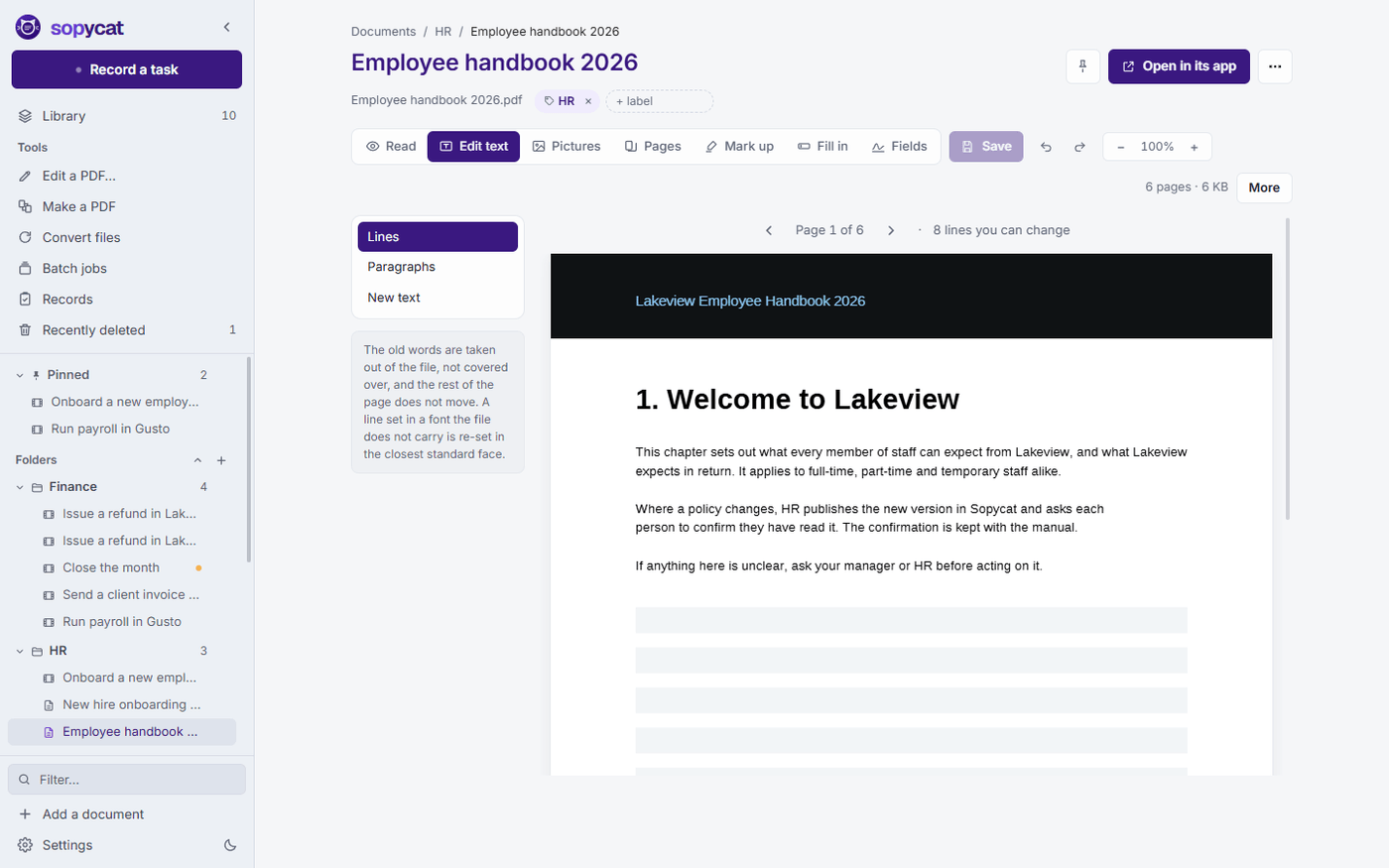
Click a line and type
The old words are taken out of the file, not painted over, so search and copy and paste find the new ones.
- Rewrite a whole paragraph and it wraps again inside its own box.
- Add new text anywhere, in the document's own fonts or the ones on your PC.
- Move, rotate, resize, replace or remove the pictures in the file.
- Edits on every tab wait together, and one Save writes them all.
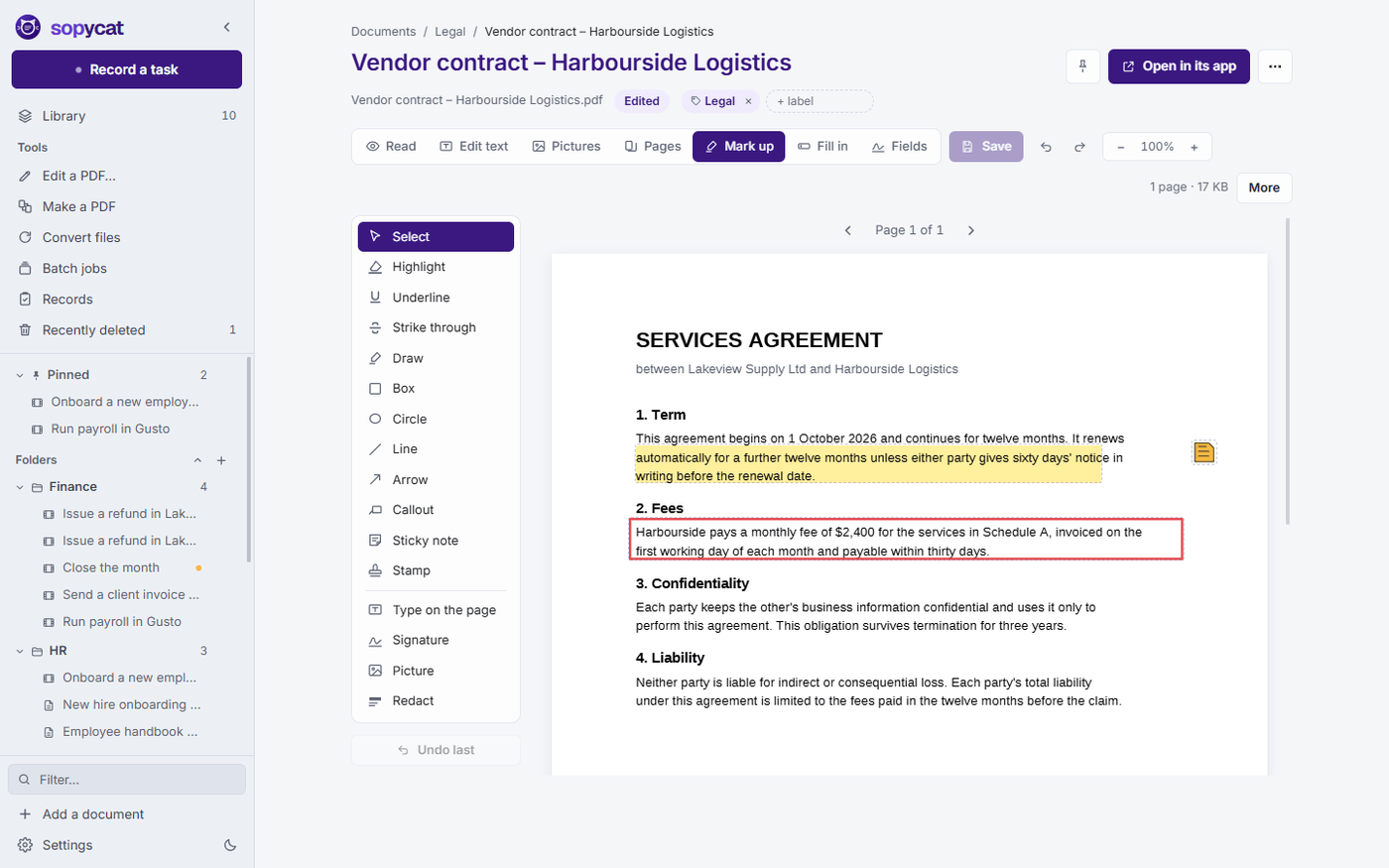
Mark up, sign and fill in
- Highlight, underline, draw, and add boxes, arrows, callouts and sticky notes. They are real comments any PDF reader shows, with your name and the date.
- Draw or type your signature once and place it with a click. Stamp Approved, Received or Paid with today's date.
- Fill in a form's own boxes, or save your usual answers as a profile and fill the next form in one go.
- Add fill-in boxes to a PDF that has none. Sopycat can find the lines and boxes for you.
- Sign with a certificate, and check the signatures already in a file.
Redaction you can actually trust
A black box drawn over words hides them from the eye but leaves them in the file. Sopycat takes them out, then checks its own work.
Mark what must go
Drag boxes over it, or find every email address, phone number, card number or word you name and redact them all at once.
Sopycat removes and checks
The words and picture data under each box leave the file. Then the page is read again. If anything survives, that area is flattened into a picture and painted black.
Nothing unchecked is saved
If a page still cannot be cleared, nothing is saved and Sopycat tells you why. A log of what was removed stays beside the document.
Word files open in Sopycat's own editor. Excel, PowerPoint and older Office files are converted with the free Office pack, a one-time download from Settings.
One app for the manuals and the paperwork
The PDF editor comes with every plan, trial included. Cancel that second subscription.